Engagement rate calculator, right on the profile page
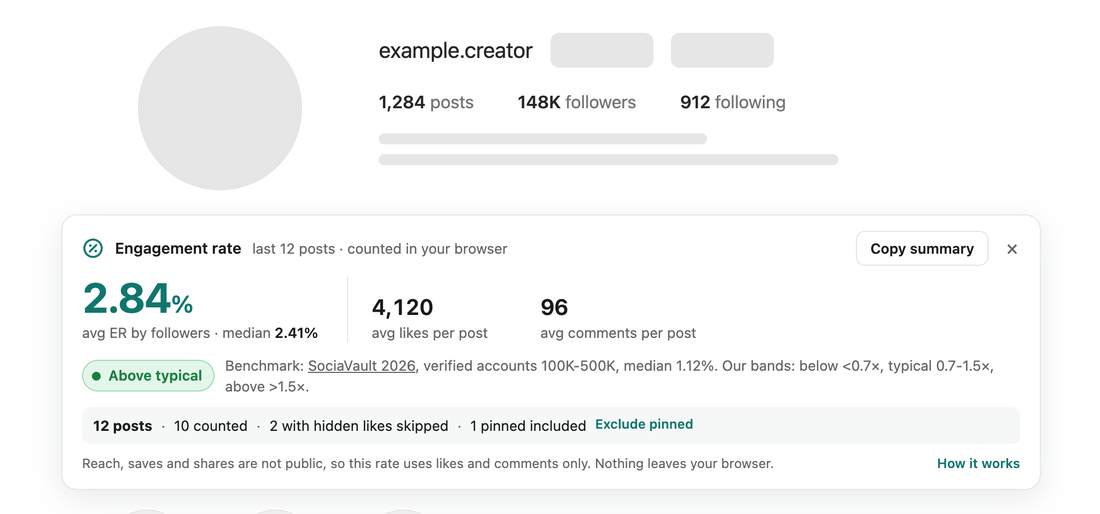
Open a public profile on instagram.com and a small card shows its engagement rate, the median, average likes and comments per post and a benchmark for accounts of that size. Nothing to type or paste.
Add to ChromeComing soon to the Chrome Web Store.
A Chrome extension. The math happens in your browser.
How it works
- Open a profileGo to any public profile on instagram.com. The card appears under the header in a second or two.
- Read the numbersEngagement rate by followers, the median, average likes and comments, and a label from below typical to above typical.
- Copy or adjustCopy a plain-text summary, leave pinned posts out, or switch the benchmark in the toolbar window.
How the engagement rate is calculated
The card uses the common formula for influencer engagement rate: likes plus comments, divided by followers, times 100, averaged over the latest 12 posts the profile grid loads. Reach, saves and shares are private to the account owner, so they are not part of it. Posts with hidden likes are left out instead of guessed, collabs owned by another account are not counted, and if fewer than 6 posts are left, the number turns grey and says so. The median sits next to the average, because one viral post can pull an average up.
What counts as a good engagement rate
Smaller accounts usually have a higher rate. By default the card compares a profile with the median for accounts of the same size, from SociaVault's 2026 data on verified accounts: 3.42% for 1K-10K followers, 2.15% for 10K-50K, 1.53% for 50K-100K, 1.12% for 100K-500K and 0.81% for 500K and up. You can switch to one overall figure instead, 0.48% from Socialinsider's 2025 study of business accounts. Below typical means under 0.7 times the benchmark, above typical means over 1.5 times.
Questions
Is this a website or an extension?
An extension for Google Chrome. It adds a small card under the header of a public profile on instagram.com, so you see the engagement rate without typing numbers into a form.
What is a good engagement rate?
It depends on the size of the account. In SociaVault's 2026 data the median is 3.42% for accounts with 1K-10K followers and 0.81% for 500K and up. The card compares a profile with accounts of its own size.
Does it send anything anywhere?
No. The extension reads only what the page you opened has already loaded, does the math in your browser and makes no requests of its own. There is no account and no sign-up.
How the extension handles your data: privacy policy.